
Passwords, MFA and Passkeys: Understanding the Future of Account Security
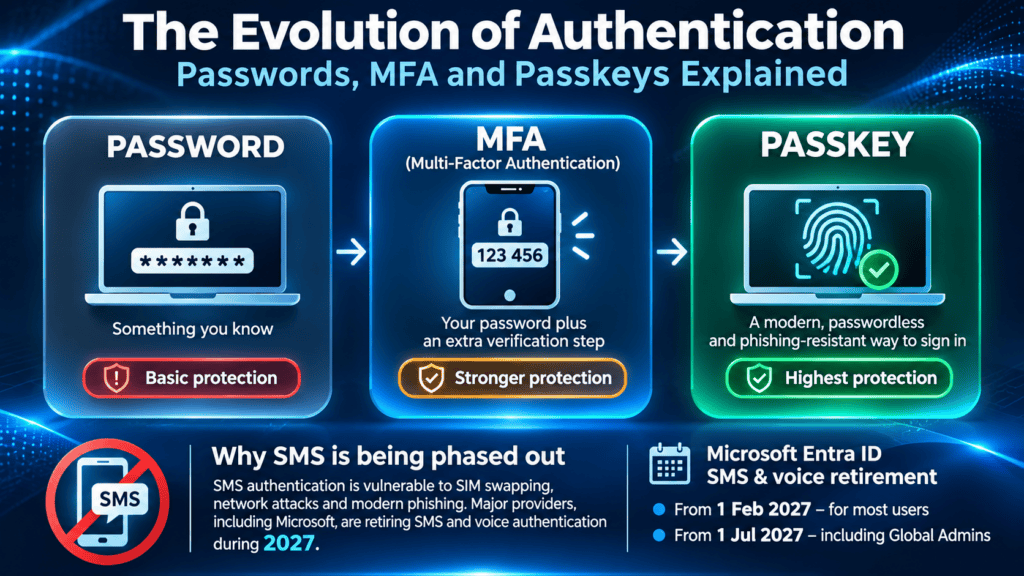
Passwords, MFA and Passkeys: Understanding the Future of Account Security
Is your password really enough to protect your online accounts? For decades, passwords have been the primary method of protecting computer systems, email accounts, financial services and business applications. However, as cyberattacks become increasingly sophisticated, relying solely on a username and password is no longer considered an adequate security strategy.
Multi-factor authentication (MFA) has significantly improved account security, but not all authentication methods provide the same level of protection.
Traditional SMS verification codes, authenticator applications, hardware security keys and modern passkeys all work differently. Understanding those differences can help individuals and businesses make better decisions about protecting their information.
With major technology providers moving towards phishing-resistant authentication, now is the time to understand why passwords alone are insufficient, why SMS authentication is being phased out, and how passkeys are changing the way we access our accounts.
Authentication: How Does a System Know Who You Are?
Authentication is the process of verifying that someone attempting to access a computer system, application or online service is authorised to use the associated identity.
Authentication is generally based on three recognised categories:
- Something You Know: A password, passphrase or PIN.
- Something You Have: A mobile phone, registered device, authenticator application or hardware security key.
- Something You Are: A biometric characteristic, such as a fingerprint or facial recognition.
Traditional password authentication relies on something you know. Multi-factor authentication combines evidence from two or more different categories to establish greater confidence in the user’s identity.
Using two passwords does not constitute multi-factor authentication. Both passwords belong to the same authentication category.
Traditional Passwords: The Foundation of Account Security
Passwords have been used to protect computer systems for decades. They are familiar, inexpensive to implement and supported by almost every operating system and online service.
Unfortunately, passwords also introduce several significant security challenges.
- Password Reuse: Users frequently use the same password across multiple websites and services.
- Weak Passwords: Short, predictable passwords can be vulnerable to automated guessing attempts.
- Phishing: Fraudulent websites and emails can persuade users to disclose their credentials.
- Data Breaches: Compromised services may expose password information that attackers can attempt to crack.
- Credential Stuffing: Attackers reuse credentials obtained from one breached service against other online accounts.
- Password Spraying: Common passwords are attempted against multiple user accounts.
- Malware: Compromised computers may capture passwords as they are entered.
Even a long, complex password can be compromised if its owner enters it into a convincing fraudulent website.
Password strength and phishing resistance are two very different things.
What Makes a Good Password?
Where passwords remain necessary, users should prioritise length, uniqueness and unpredictability.
A strong password does not necessarily need to consist of a difficult-to-remember combination of random symbols. A sufficiently long passphrase made from unrelated words can provide effective protection while remaining easier to remember.
Recommended password practices include:
- Use Long Passwords: Aim for at least 15 characters where practical, particularly for accounts protected only by a password.
- Use Unique Passwords: Never reuse the same password across multiple services.
- Use a Password Manager: Generate and securely store long, random credentials.
- Avoid Personal Information: Names, birthdays, football teams and pet names are often predictable.
- Check for Compromised Passwords: Organisations should prevent the use of known breached and commonly used credentials.
- Change Compromised Credentials Immediately: Suspected exposure should trigger appropriate account recovery and security checks.
- Enable MFA: A password should not be the only protection for an important account wherever stronger authentication is available.
Modern security guidance generally advises against forcing routine password changes without evidence of compromise. Frequent mandatory changes can encourage users to adopt predictable password variations.
For example, changing a password from PasswordNovember2026! to PasswordDecember2026! does not represent a meaningful improvement in security.
Important: Organisations should still comply with applicable regulatory requirements and ensure their password policies are appropriate for their individual risk profiles.
How Should Passwords Be Stored?
Online services should not normally store user passwords as readable text.
Instead, properly designed authentication systems store a password-derived value generated using a suitable password hashing algorithm and a unique random salt.
Modern password hashing technologies include:
- Argon2id
- bcrypt
- scrypt
- PBKDF2: When configured with appropriate parameters.
When a user signs in, the authentication system processes the supplied password and checks it against the stored verification information.
Unlike ordinary reversible encryption, password hashing is designed to make recovering the original password computationally difficult.
However, weak passwords may still be discovered through guessing attacks against stolen password hashes.
This is one reason why password length, secure storage and additional authentication controls remain important.
Multi-Factor Authentication: Adding Another Layer of Protection
Multi-factor authentication, commonly referred to as MFA, requires authentication evidence from more than one independent category.
Consider an employee attempting to access their Microsoft 365 email account.
Instead of granting access immediately after the correct password is entered, the system requests additional verification through a registered authentication method.
Depending on the configuration, this could involve:
- Entering a verification code received by SMS.
- Entering a temporary code generated by an authenticator application.
- Approving a notification on a registered mobile device.
- Using a physical security key.
- Using a passkey protected by local user verification.
If an attacker obtains the employee’s password, MFA can prevent that password alone from being sufficient to access the account.
However, MFA is not a single technology. It describes a security approach that can be implemented using several different authentication methods.
Having MFA enabled does not necessarily mean an account is protected against every form of phishing.
SMS Authentication: Why Is It Being Phased Out?
SMS-based authentication typically works by sending a temporary verification code to a registered mobile telephone number.
The user enters their password and then supplies the code received by text message.
This provides additional protection against password-only attacks and has historically been popular because it does not require users to install an additional application.
Unfortunately, SMS authentication depends on the security of the mobile telecommunications network, the registered telephone number and the user’s ability to recognise fraudulent requests.
SIM Swapping
SIM swapping occurs when an attacker fraudulently obtains control of a victim’s mobile telephone number.
If the number is transferred to a SIM or eSIM controlled by the attacker, SMS verification messages intended for the legitimate account holder may instead be delivered to the attacker.
The victim’s original mobile phone may unexpectedly lose network connectivity.
Mobile Network Vulnerabilities
SMS delivery relies on telecommunications infrastructure. Vulnerabilities within mobile networks and signalling systems, including legacy technologies such as SS7, have historically created opportunities for unauthorised message interception.
SMS messages should not be treated as an end-to-end encrypted authentication channel.
Real-Time Phishing
Fraudulent websites can imitate legitimate sign-in pages and request both the user’s password and their SMS verification code.
Because an SMS code can be entered into a website and relayed in real time, its temporary nature does not automatically prevent phishing.
Social Engineering
Attackers may impersonate bank employees, IT support technicians or other trusted individuals and persuade a victim to disclose a verification code.
A message containing a code may even be triggered by a genuine authentication attempt initiated by the attacker.
Never disclose an authentication code to someone who contacts you unexpectedly, regardless of who they claim to represent.
Reliability and Availability
SMS authentication can also introduce operational problems, including delayed messages, poor mobile coverage, roaming restrictions, lost telephone numbers and unreliable message delivery.
These limitations can create unnecessary disruption when users need to access important business applications.
SMS authentication is generally better than password-only authentication, but stronger alternatives should be adopted wherever practical.
Microsoft Entra ID: The Retirement of Microsoft-Provided SMS and Voice Authentication
The transition away from SMS authentication is no longer simply a theoretical cybersecurity recommendation.
Microsoft has announced changes to its Entra ID authentication services, with passkeys becoming the default experience and Microsoft-provided SMS and voice delivery being retired in stages.
According to Microsoft’s published roadmap, current as of November 2026, the following milestones apply:
| Date | Change |
|---|---|
| 1 September 2026 | Microsoft begins automatic passkey enablement and registration prompts for affected SMS and voice users. |
| 1 February 2027 | Microsoft-provided SMS and voice authentication is scheduled to end for most users. |
| 1 July 2027 | The retirement extends to Global Administrators and external users covered by the announcement. |
Organisations with legitimate requirements to retain telephone-based authentication may have options involving separately configured telecommunications providers.
This announcement does not mean that SMS authentication is disappearing from every website, bank or online service. It relates specifically to the affected Microsoft Entra ID authentication services.
IT administrators should review Microsoft’s current documentation, tenant configuration and applicable exceptions before implementing changes.
Further information is available in the official Microsoft SMS and voice authentication retirement announcement.
Authenticator Applications: A Better Alternative to SMS?
Authenticator applications provide several ways of verifying a user’s identity without relying exclusively on SMS delivery.
Examples include Microsoft Authenticator, Google Authenticator and other compatible authentication applications.
Time-Based One-Time Passwords (TOTP)
Time-based one-time passwords are temporary numerical codes generated using a shared secret and the current time.
The codes typically change every 30 seconds and can generally be generated without a mobile network or internet connection.
This removes dependence on SMS delivery and reduces exposure to telephone-number-related attacks.
However, users can still be persuaded to enter these codes into fraudulent websites. Traditional authenticator codes are therefore not considered phishing-resistant authentication.
Push Notification Authentication
Push-based authentication sends an approval request to a registered device when someone attempts to access an account.
The user can approve or reject the sign-in request.
Although convenient, basic approval notifications can be vulnerable to a technique known as MFA fatigue.
An attacker with compromised credentials may repeatedly trigger authentication requests in the hope that the user eventually approves one out of confusion, frustration or curiosity.
Number Matching
Number matching improves push-based authentication by requiring the user to enter or select a number displayed during the sign-in process.
This makes accidental approval more difficult and provides additional context for the authentication request.
However, users may still be manipulated into approving fraudulent requests. Number matching improves security but is not equivalent to phishing-resistant authentication.
If you receive an authentication request that you did not initiate, reject it and investigate why it occurred.
How Modern Phishing Can Defeat Traditional MFA
Many people assume that enabling MFA makes their accounts immune to phishing.
Unfortunately, this is not always the case.
Modern phishing techniques can involve an intermediary positioned between a victim and a legitimate online service. This is commonly referred to as an Adversary-in-the-Middle (AiTM) attack.
Rather than simply collecting a password, a sophisticated phishing service may attempt to relay the authentication process and capture information associated with the authenticated session.
In some circumstances, a stolen session token may allow an attacker to access an account without having to repeat the original MFA challenge.
This is why traditional verification codes and approval notifications, although valuable, cannot provide complete protection against modern credential and session theft.
Phishing-resistant authentication methods are designed to address important weaknesses in this traditional authentication process.
Passkeys: Moving Beyond Traditional Passwords
A passkey is a cryptographic credential that allows users to authenticate without relying on a traditional password.
Passkeys are based on open authentication standards developed through the FIDO Alliance, including FIDO2 and WebAuthn.
Instead of requiring a user to remember a secret and submit it to an online service, passkeys use public-key cryptography to prove that the user controls an appropriate authentication credential.
Depending on the device and service, users may authenticate using:
- Fingerprint recognition.
- Facial recognition.
- A local device PIN.
- A registered mobile device.
- A compatible hardware security key.
- A supported password or credential manager.
To the user, signing in may be as simple as unlocking their mobile phone or confirming their identity using Windows Hello.
Behind that simple experience is a fundamentally different authentication mechanism.
How Do Passkeys Actually Work?
When a passkey is registered with an online service, the authenticator creates a pair of mathematically related cryptographic keys.
- Public Key: Registered with the online service and used to verify authentication.
- Private Key: Protected by the authenticator or credential provider and used to prove possession of the credential.
Step 1: Register the Passkey
The user creates a passkey for a supported website or application.
The service receives the public key, while the private key is protected by the user’s authenticator or secure credential store.
Step 2: Request Authentication
When the user subsequently signs in, the online service issues a unique authentication challenge.
Step 3: Verify the User Locally
The authenticator may require the user to confirm their identity with a fingerprint, facial recognition or local device PIN.
Step 4: Sign the Authentication Challenge
The authenticator uses the private key to produce a cryptographic signature associated with the authentication request.
Step 5: Verify the Signature
The online service uses the registered public key to verify the response.
If the required checks succeed, the user can be granted access.
The private key is not submitted to the website as part of the authentication process.
Unlike traditional password authentication, there is no reusable account password for the user to type into a fraudulent sign-in page during a passkey-based login.
Why Are Passkeys Resistant to Phishing?
One of the most important advantages of passkeys is that their use is bound to the legitimate service for which they were registered.
Consider a user with a passkey registered for a genuine business application.
An attacker creates a fraudulent website that visually resembles the genuine application. The logo, colours, terminology and sign-in interface may all appear identical.
However, the fraudulent website has a different web origin and cannot ordinarily use the passkey registered for the genuine service.
The authentication mechanism checks the relationship between the credential and the requesting service rather than simply trusting the appearance of a website.
This makes passkeys substantially more resistant to conventional credential phishing and authentication relay attacks.
They also remove the need to transmit reusable passwords and ordinary one-time verification codes during passkey authentication.
Passkeys are phishing-resistant, but this does not mean accounts using passkeys are immune to every cyberattack.
Compromised devices, stolen authenticated sessions, insecure recovery mechanisms and weaker alternative sign-in methods can still introduce security risks.
Does Using a Passkey Send Your Fingerprint to the Website?
This is an understandable concern, particularly when users are asked to authenticate using fingerprint or facial recognition technology.
In a typical passkey authentication process, biometric verification takes place locally on the user’s device.
The online service receives cryptographic evidence of successful authentication rather than a copy of the user’s fingerprint or facial image.
Similarly, a device PIN used to unlock a passkey authenticator is not normally transmitted to the online service.
This is an important distinction between a traditional account password and a local authentication PIN.
A local PIN associated with a specific protected device is not equivalent to a reusable account password that can be submitted from another computer.
Are Passkeys the Same as Multi-Factor Authentication?
Passkeys and MFA are often described as competing technologies, but this is not entirely accurate.
MFA describes the use of multiple authentication factors. A passkey describes a particular type of cryptographic authentication credential.
A passkey can provide multi-factor authentication when its use requires possession of the credential combined with appropriate local user verification, such as a PIN or biometric check.
For example:
- Something You Have: Control of the registered passkey credential.
- Something You Know or Are: The PIN or biometric verification required to authorise its use.
When implemented with the appropriate user-verification requirements, these factors can be combined into a single sign-in experience.
However, not every passkey implementation automatically satisfies every organisational or regulatory MFA requirement. Authentication assurance depends on the authenticator, configuration and applicable security policy.
Passwordless authentication does not necessarily mean single-factor authentication.
Synced Passkeys vs Device-Bound Passkeys
There are two important approaches to storing and managing passkeys.
Synchronised Passkeys
Synchronised passkeys can be managed through supported credential providers and securely made available across a user’s compatible devices.
Examples of credential management environments include:
- Google Password Manager.
- Apple’s iCloud Keychain and Passwords application.
- Compatible third-party password managers.
This approach can make passkeys convenient for individuals who regularly use multiple computers and mobile devices.
However, the security of the credential provider, its synchronisation mechanisms and account recovery process becomes an important consideration.
Device-Bound Passkeys
Device-bound passkeys are associated with a particular authenticator and are not ordinarily synchronised to other devices.
Depending on the implementation, they may be protected by dedicated hardware or a physical security key.
Organisations with sensitive administrative accounts or higher authentication assurance requirements may prefer approved device-bound credentials.
They must also ensure appropriate recovery arrangements are available if a registered device is lost, damaged or replaced.
Both approaches can provide phishing-resistant sign-in, but their management, recovery and assurance characteristics differ.
Hardware Security Keys and Windows Hello for Business
Hardware security keys provide another way of implementing phishing-resistant authentication.
FIDO2-compatible security keys may connect through USB, NFC or other supported interfaces.
They can store or protect cryptographic credentials independently of the computer being used to access the online service.
Hardware security keys can be particularly useful for:
- Privileged administrator accounts.
- Employees handling sensitive information.
- Users who cannot use a personal mobile phone.
- Shared workstation environments.
- Organisations with strict authentication requirements.
Windows Hello for Business also provides a key-based authentication approach for supported Microsoft enterprise environments.
It can use a local PIN or biometric verification to authorise the use of a protected credential, rather than requiring the user’s traditional account password during normal authentication.
Where available and correctly configured, hardware-backed protection can improve the security of these credentials.
Passwords, MFA and Passkeys: Comparing the Differences
The following table compares several commonly used authentication approaches.
| Authentication Method | Additional Protection Against Stolen Passwords | Phishing Resistant |
|---|---|---|
| Password Only | No | No |
| Password and SMS Code | Yes | No |
| Password and Authenticator Code | Yes | No |
| Password and Basic Push Approval | Yes | No |
| Password and Number Matching | Yes | No |
| FIDO2 Passkey | No reusable password required for passkey sign-in | Yes |
| FIDO2 Hardware Security Key | Yes, when appropriately enforced | Yes |
| Windows Hello for Business | Yes, when appropriately enforced | Yes |
These comparisons assume correct implementation and configuration. An account that supports strong authentication but still allows unrestricted use of weaker alternative methods may remain vulnerable through those alternatives.
What Happens If You Lose Your Phone or Security Key?
Account recovery is an essential consideration when implementing any authentication technology.
A user who loses a mobile telephone, damages a security key or replaces a computer must have a secure way to regain access to their accounts.
Depending on the service, appropriate recovery arrangements may include:
- Registering an additional supported passkey.
- Maintaining a separately stored backup security key.
- Using securely stored account recovery codes.
- Using an approved credential synchronisation service.
- Following an appropriately controlled IT support recovery process.
- Using time-limited onboarding or recovery credentials where supported.
However, recovery processes must not undermine the security of the primary authentication method.
For example, protecting an account with a phishing-resistant passkey while allowing anyone with access to the associated telephone number to reset the account may introduce a weaker recovery path.
An account is only as secure as the weakest authentication or recovery route available to an attacker.
Protecting Microsoft 365 and Business Accounts
For businesses using Microsoft 365, authentication should form part of a wider identity and access management strategy.
Microsoft Entra ID provides technologies that allow organisations to control authentication methods and, with appropriate licensing, implement Conditional Access policies.
Businesses should consider the following controls:
- Require MFA: Ensure that interactive user accounts are protected by appropriate multi-factor authentication.
- Review Authentication Methods: Identify users relying on SMS, voice calls or other weaker verification methods.
- Implement Phishing-Resistant Authentication: Prioritise passkeys, FIDO2 security keys and Windows Hello for Business where supported.
- Protect Administrator Accounts: Apply stronger authentication requirements to privileged identities.
- Separate Administrative Accounts: Avoid using privileged accounts for routine email and internet browsing.
- Conditional Access: Apply authentication strength, device compliance and location or risk-based controls where supported and licensed.
- Disable Legacy Authentication: Prevent outdated authentication protocols from undermining modern security controls.
- Monitor Sign-In Activity: Investigate unusual authentication attempts and unexpected changes to authentication methods.
- Protect Account Recovery: Ensure that helpdesk identity verification and authentication reset processes cannot be easily exploited.
- Emergency Access: Maintain appropriately protected, independently monitored and regularly tested emergency access accounts.
Microsoft 365 Business Premium includes Microsoft Entra ID P1, which provides access to Conditional Access capabilities. Some advanced identity risk-based features require additional licensing.
Authentication controls should be carefully planned, tested and documented before being applied across an entire organisation.
Moving Away From SMS: A Practical Migration Strategy
Businesses should not simply disable SMS authentication without first understanding how their employees currently access essential systems.
A controlled migration reduces the risk of account lockouts, business disruption and unnecessary support requests.
- Audit Existing Authentication Methods: Identify users, administrators and applications that depend on SMS or voice verification.
- Assess Business Requirements: Consider device compatibility, shared workstations, accessibility requirements and restrictions on mobile telephone use.
- Select Appropriate Replacement Methods: Determine whether passkeys, Windows Hello for Business, hardware security keys or other approved alternatives are suitable.
- Prepare Recovery Procedures: Establish secure processes for device loss, replacement and account recovery.
- Run a Pilot Deployment: Test the proposed configuration with a representative group of users.
- Provide User Training: Explain the new authentication experience and how to recognise fraudulent requests.
- Deploy in Phases: Expand the deployment gradually, monitoring authentication failures and support requirements.
- Verify Replacement Methods: Confirm that affected users can authenticate and recover access securely before removing their existing methods.
- Restrict Weaker Authentication: Apply appropriate policies to prevent unnecessary fallback to less secure methods.
- Review and Monitor: Regularly assess authentication activity, registered credentials and policy effectiveness.
Any exceptions should be documented alongside the associated security risks, compensating controls and appropriate management approval.
Cybersecurity improvements should strengthen protection without unnecessarily preventing employees from carrying out their work.
What Should Home Users Do?
Improving personal account security does not necessarily require specialist technical knowledge or expensive equipment.
There are several practical steps that most people can take:
- Protect Your Primary Email Account: This is often used to recover access to many other services.
- Use a Password Manager: Create unique, strong passwords for accounts that still require them.
- Enable MFA: Protect important accounts wherever additional authentication is available.
- Prefer Passkeys: Use passkeys where supported and practical.
- Consider Authenticator Applications: Move away from SMS verification when stronger alternatives are available.
- Keep Devices Updated: Install operating system, browser and application security updates.
- Protect Your Mobile Phone: Use an appropriate screen lock and secure the accounts responsible for device recovery.
- Maintain Recovery Options: Securely store recovery information before changing authentication methods.
- Reject Unexpected Authentication Requests: Never approve a sign-in that you did not initiate.
- Never Share Verification Codes: Be suspicious of anyone asking you to read out or forward a security code.
If SMS is the only additional authentication method offered by a service, it is generally preferable to enable it rather than rely entirely on a password.
The objective should be to improve account security progressively, adopting stronger methods as they become available.
Authentication Is Only One Part of Cybersecurity
Strong authentication is essential, but it does not replace other important cybersecurity controls.
Even an organisation using phishing-resistant authentication may remain vulnerable to compromised endpoints, malicious browser extensions, stolen session tokens, excessive account permissions and social engineering attacks.
A comprehensive security strategy should also include:
- Regular operating system and application patching.
- Endpoint detection and response protection.
- Appropriate device management and compliance policies.
- Least-privilege access controls.
- Secure email and web filtering.
- Cybersecurity awareness training.
- Security monitoring and incident response procedures.
- Reliable and independently protected backups.
- Regular security reviews and risk assessments.
The objective is to establish multiple independent layers of protection so that the failure of one security control does not automatically result in a successful cyberattack.
Final Thoughts: Is It Time to Move Beyond Passwords?
Passwords have served an important purpose for decades, but the threats facing individuals and businesses have evolved considerably.
Traditional multi-factor authentication provides a significant improvement over password-only security. However, SMS verification, authenticator codes and basic approval notifications all have limitations that modern phishing attacks can exploit.
Passkeys represent an important step forward by replacing reusable secrets with cryptographic authentication that is bound to the legitimate online service.
For individuals, this can provide a simpler and more secure sign-in experience.
For businesses, it offers an opportunity to improve identity security, reduce reliance on traditional passwords and strengthen protection against credential-based cyberattacks.
However, successful implementation requires careful consideration of authentication policies, account recovery, device security, user training and business requirements.
The question is no longer simply whether your business uses multi-factor authentication. It is whether the authentication methods you rely upon are strong enough to withstand the threats your business faces today.
Further Reading and Official Security Guidance
The following organisations provide additional information about secure authentication, password management and passkey technologies:
- UK National Cyber Security Centre (NCSC) – Cybersecurity advice for individuals and organisations.
- NIST Digital Identity Guidelines – Technical guidance on authentication and authenticator management.
- Microsoft Entra ID SMS and Voice Authentication Retirement – Official retirement announcement and migration guidance.
- FIDO Alliance – Passkeys – Information about modern passwordless authentication standards.
Need Help Improving Your Business Account Security?
At Paul Clarke IT Consultancy, I help businesses assess their IT infrastructure, identify cybersecurity risks and implement practical security improvements.
Whether you are using Microsoft 365, managing an existing Windows infrastructure or looking to move away from traditional SMS authentication, I can help you understand your current security position and develop an appropriate improvement strategy.
My services include:
- Microsoft 365 security assessments.
- Microsoft Entra ID authentication reviews.
- Multi-factor authentication deployment.
- Passkey and passwordless authentication planning.
- Conditional Access configuration.
- Privileged account security reviews.
- Cybersecurity risk assessments and mitigation planning.
- Cybersecurity awareness and user guidance.
Effective cybersecurity does not necessarily mean investing in expensive new systems. In many cases, significant improvements can be achieved by correctly configuring and managing technologies that your organisation already has available.
Find out more about my IT consultancy and infrastructure services, or get in touch to discuss how your business can improve its account security.
Technical Disclaimer: Authentication technologies, vendor support arrangements and security requirements evolve over time. Microsoft retirement dates referenced in this article reflect published guidance available in November 2026. Organisations should verify current vendor documentation, licensing requirements and compatibility before modifying production authentication policies. Always establish and test appropriate account recovery procedures before disabling existing authentication methods.