
The Phishing Email That Passed SPF, DKIM and DMARC – A Real Cybersecurity Incident
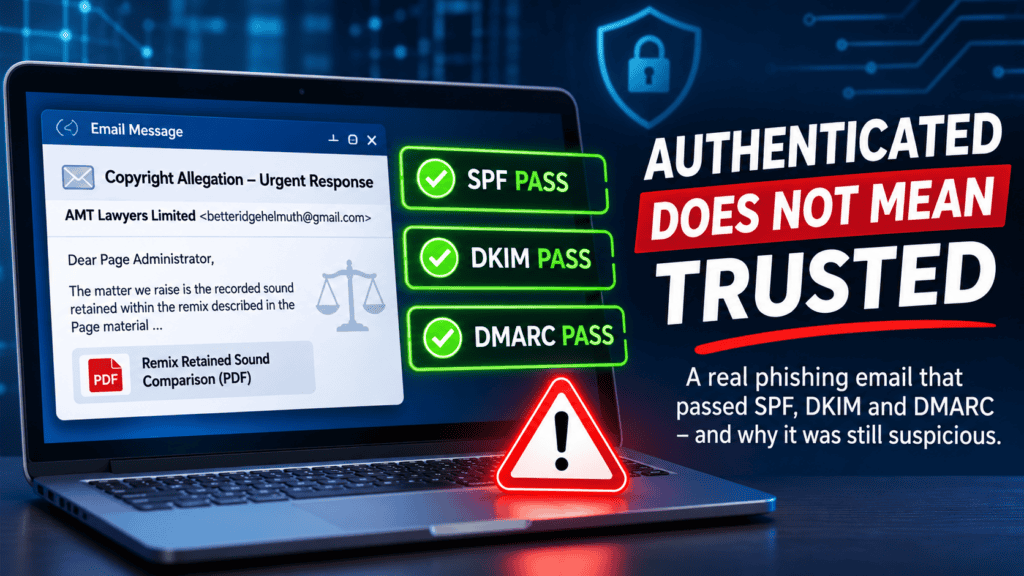
SPF passed. DKIM passed. DMARC passed. Microsoft 365 accepted the message. Yet the email was highly suspicious.
On 19 November 2026, I received an email claiming to be from a UK firm of solicitors acting on behalf of an esports organisation. The message alleged that my consultancy’s Facebook page had infringed copyright by using a protected sound recording in a remix.
There was one rather significant problem: I had not published the video or remix described in the allegation.
What followed was a useful real-world example of how convincing social engineering can bypass the assumptions people make about email security. The message passed standard email authentication checks, reached my Microsoft 365 inbox, and used the genuine contact details of an established legal firm.
After independently contacting the solicitors, I learned that another recipient had already reported similar suspicious correspondence. The firm referred the matter to its IT department for investigation, and I reported the message as phishing.
The lesson is simple: an authenticated email is not necessarily a trustworthy email.
The Incident: A Copyright Allegation That Didn’t Add Up
The email presented itself as formal legal correspondence concerning copyrighted audio allegedly used on my business Facebook page.
It contained a professional-looking layout, a correspondence reference, a postal address, a telephone number, references to UK copyright legislation and a deadline for responding.
It also included a link to a PDF supposedly containing evidence comparing the original recording with the alleged publication.
At first glance, the message appeared carefully constructed. But several details warranted investigation:
- Unexpected Allegation: The described remix did not correspond to any video I had published.
- Personal Email Address: The sender used a Gmail address while claiming to represent a firm of solicitors.
- External Evidence Link: The alleged evidence was hosted behind a shortened Google link rather than being clearly identified in the email.
- Publicly Available Details: My business name, email address and Facebook page details could all be obtained without privileged access.
- Pressure to Respond: The formal legal language and deadline encouraged the recipient to take action.
None of these indicators alone proves malicious intent. Together, however, they provided sufficient reason to treat the message as suspicious and verify its authenticity before taking any action.
Step 1: Examine the Email Authentication Results
Rather than relying on how the email looked, I examined its full message headers in Microsoft 365.
The authentication results were particularly interesting.
| Security Check | Result | Meaning |
|---|---|---|
| SPF | Pass | Google was authorised to send email for the Gmail domain. |
| DKIM | Pass | The message carried a valid Gmail cryptographic signature. |
| DMARC | Pass | The authenticated sending domain aligned with the visible Gmail sender domain. |
| Composite Authentication | Pass | Microsoft accepted the message’s email authentication identity. |
| Microsoft Spam Confidence Level | 1 | The message was assigned a low spam score. |
All the main authentication checks passed. But the critical distinction is that they authenticated the Gmail sending domain, not the solicitor’s claimed professional identity.
The message was not authenticated as originating from the legal firm’s own domain.
Step 2: Understand What SPF, DKIM and DMARC Actually Protect
SPF, DKIM and DMARC are important elements of email security, but their purpose is frequently misunderstood.
SPF – Sender Policy Framework
SPF checks whether the sending mail server is authorised to send on behalf of the domain used for the envelope sender.
In this case, Google’s mail infrastructure was authorised to send messages using Gmail. SPF therefore passed.
DKIM – DomainKeys Identified Mail
DKIM uses cryptographic signatures to verify that selected parts of an email have not been altered since signing and that the signature is associated with the signing domain.
The message carried a valid Gmail signature. That confirmed an aspect of the message’s authenticity as Gmail-originated mail, not the truthfulness of its legal claims.
DMARC – Domain-based Message Authentication, Reporting and Conformance
DMARC checks whether SPF or DKIM authentication passes with appropriate alignment to the domain displayed in the message’s From address.
Because the visible sender was a Gmail address and Gmail authentication succeeded, DMARC passed.
These controls help prevent domain spoofing. They do not establish that the person operating an authenticated account is who they claim to be in the message body.
Step 3: Why Did Microsoft 365 Allow the Email Through?
Microsoft 365 assigned the message a Spam Confidence Level (SCL) of 1 and classified it as non-spam.
That does not mean Microsoft verified the copyright allegation or the sender’s authority to represent a solicitor.
The email originated through legitimate Google mail infrastructure and passed the standard domain authentication checks. Its suspicious characteristics were primarily related to the story it told, the identity it claimed and the action it encouraged.
This illustrates an important limitation of automated filtering: a technically authenticated message can still contain a fraudulent request.
Modern email security platforms provide additional protections against phishing, malicious links, impersonation and suspicious behaviour. However, no filtering system can guarantee that every socially engineered message will be detected.
Security controls must therefore be supported by informed users, appropriate reporting procedures and independent verification.
Step 4: Recognise the Social Engineering Techniques
The email used several techniques commonly associated with phishing and impersonation attempts.
- Authority: Claiming to represent a legal firm made the correspondence appear serious and credible.
- Credibility: Genuine-looking business contact details and references to legislation reinforced the claimed identity.
- Personalisation: Including my business and Facebook page information made the allegation appear targeted.
- Concern: A potential copyright infringement allegation created a reason to investigate immediately.
- Action: The recipient was directed to an external document supposedly containing the evidence.
- Time Pressure: A requested response date encouraged action before careful verification.
The linked document was not opened during my investigation, so its ultimate destination and purpose remain unverified. It would be inappropriate to claim that it definitely contained malware or a credential-harvesting page.
Nevertheless, the link was an unnecessary risk when the sender’s claimed authority could be checked independently.
Step 5: Independently Verify the Organisation
The most important step in the investigation did not require sophisticated cybersecurity software.
I telephoned the solicitors independently.
During the conversation, I learned that I was the second person to report suspicious correspondence of this kind. The firm passed the matter to its IT department for investigation.
This was a much stronger basis for assessing the message than relying on the branding, contact information or legal references included in the email.
Importantly, the contact details used for verification should always come from a trusted, independently obtained source rather than an unverified message.
For a business, this principle applies equally to unexpected supplier bank-detail changes, invoice requests, password reset instructions, document-sharing invitations and urgent messages from senior management.
Step 6: Report and Preserve the Suspicious Message
After reviewing the message and speaking to the solicitors, I reported the email as phishing through Microsoft 365.
I also retained the original message headers for reference.
Useful evidence for an investigation may include:
- Original Message: Preserve the complete email rather than relying only on screenshots.
- Message Headers: Retain the Received chain, authentication results, Message-ID and relevant filtering information.
- Suspicious URLs: Record the link without visiting it unnecessarily.
- Timeline: Document when the message arrived, when it was reviewed and when it was reported.
- Verification: Record which organisation was contacted and the outcome of that conversation.
- Exposure Assessment: Establish whether anyone clicked the link, supplied credentials or downloaded files.
Where a business user has interacted with a suspected phishing message, the response may also require sign-in log review, session revocation, credential resets, endpoint investigation and assessment of any unauthorised account activity.
Those actions should be proportionate to the evidence and the organisation’s incident-response procedures.
How Can Small Businesses Protect Themselves?
Small businesses are attractive targets for impersonation and phishing because attackers can exploit familiar processes such as invoicing, supplier correspondence, document sharing and account administration.
Practical security measures include:
- Configure Email Authentication: Implement SPF, DKIM and DMARC correctly for your own domains, and monitor their operation.
- Use Modern Email Protection: Review anti-phishing, impersonation, URL protection and attachment policies available within your licensing.
- Require Multifactor Authentication: Prefer phishing-resistant methods where practical, particularly for privileged accounts.
- Train Staff: Teach users to recognise suspicious requests even when messages appear professional and technically authenticated.
- Verify Sensitive Requests: Confirm unexpected legal, financial or account-related requests using an independently established contact method.
- Provide Simple Reporting: Make it easy for employees to report suspicious emails without fear of criticism.
- Prepare an Incident-Response Process: Define who investigates, what evidence is retained and when incidents are escalated.
- Review Security Regularly: Assess configurations, emerging threats and the effectiveness of existing controls.
Most importantly, cybersecurity should not depend on one technical control or one employee spotting every suspicious message.
Effective protection comes from combining technical security, documented processes, awareness and a culture of verification.
What Did This Incident Teach Us?
There are several useful lessons from this real-world example:
- Authentication Is Not Trust: SPF, DKIM and DMARC can all pass on a fraudulent email.
- Professional Appearance Proves Little: Formal language, legislation and business addresses can be copied.
- Personalisation Is Not Proof: Publicly available business details can make an impersonation attempt look convincing.
- Filtering Is Not Infallible: A low spam score does not guarantee that a message is safe.
- Independent Verification Works: A telephone call using independently obtained details can resolve questions that an email cannot.
- Reporting Matters: Reporting suspicious messages helps security teams and service providers investigate potential campaigns.
In this case, the most useful defence was not a complicated security product. It was recognising that the message did not make sense, checking the technical evidence and independently verifying the claim.
The Final Outcome: A Suspicious Email, Properly Investigated
The email passed SPF, DKIM and DMARC checks and reached my Microsoft 365 inbox with a low spam score.
However, the alleged copyright infringement did not correspond to material I had published, the sender used a personal Gmail account, and the claimed legal representation warranted independent verification.
After contacting the solicitors, I learned that another recipient had already raised a similar concern and that the matter had been referred to the firm’s IT department. The email was reported as phishing.
The sender’s true identity and the external document’s contents have not been established, so the investigation should not be presented as proof of a particular malware campaign or confirmed account compromise.
The wider lesson is clear: email authentication is essential, but cybersecurity also requires critical thinking, verification and a willingness to challenge unexpected requests.
Could Your Business Identify a Similar Phishing Attempt?
At Paul Clarke IT Consultancy, I help businesses in Crewe, Nantwich, Sandbach and the surrounding areas improve their cybersecurity, Microsoft 365 security configuration and incident-response readiness.
Whether you need an email security review, a Microsoft 365 configuration assessment, cybersecurity awareness training or help developing practical incident-response procedures, my approach focuses on proportionate security measures and clearly understood risks.
Good cybersecurity is not about buying every available security product. It is about understanding the threats, implementing effective controls and ensuring people know what to do when something suspicious happens.
Contact Paul Clarke IT Consultancy to discuss protecting your business against phishing, impersonation and other cybersecurity threats.
Technical Disclaimer: This article documents a suspicious email received in November 2026 and the steps taken to investigate it. Details identifying third parties, individual email accounts, message identifiers and suspicious URLs have been omitted. The available evidence supports treating the correspondence as a suspected impersonation attempt, but does not establish the sender’s identity, the linked document’s contents or any resulting compromise. Email authentication and filtering behaviour vary by provider, configuration and message.