
Are Your Backups Really Safe? Why Encryption, Immutability and Recovery Testing Matter
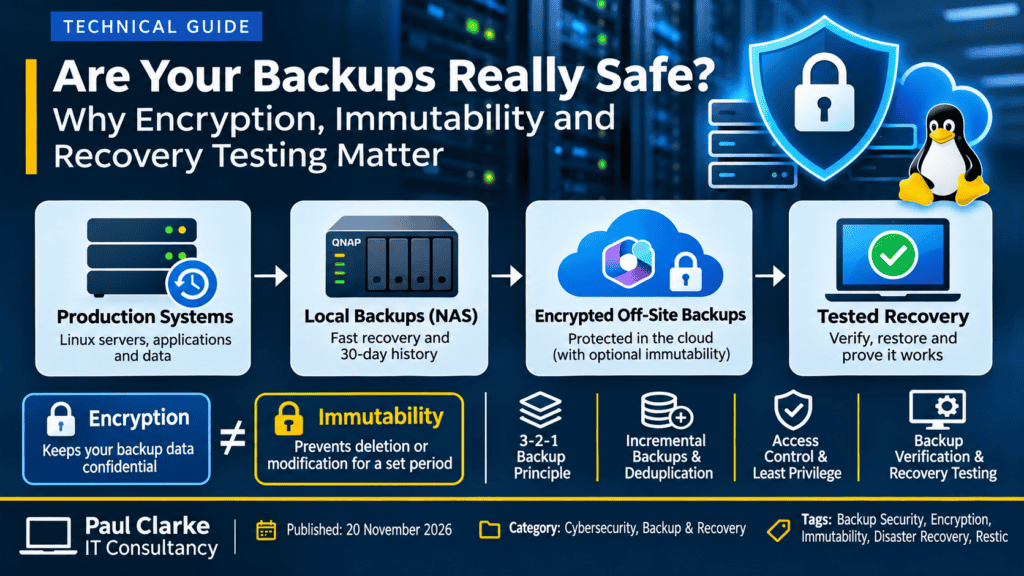
Backup Security is critical!
Having a backup does not necessarily mean your data is safe. Many businesses invest in backup solutions, configure automated schedules and receive daily reports confirming that their backups have completed successfully. Unfortunately, far fewer consider what happens if the backup infrastructure itself becomes the target of a cyberattack.
Ransomware, compromised administrator accounts, accidental deletion and hardware failures can all affect backup systems. Simply storing information on a network-attached storage (NAS) device or in the cloud does not guarantee that it will be recoverable when needed.
A robust backup strategy must consider not only where data is stored, but also who can access it, whether it can be modified or deleted, how its integrity is verified, and whether it can actually be restored.
The Hidden Risk: Backups That Attackers Can Delete
Imagine a business that performs daily backups to a network-attached storage device.
Everything appears to be working correctly. The backup software reports success, recovery points are available, and management believes that business data is protected.
But what happens if an attacker compromises an administrator account that also has permission to delete those backups?
The attacker could potentially remove the recovery points before encrypting the production systems. The organisation may then discover that its backup strategy offers little protection against the very incident it was designed to address.
This is why backup access controls and separation of privileges are just as important as backup frequency.
Encryption vs Immutability: Understanding the Difference
Encryption and immutability are often discussed together, but they provide very different types of protection.
Backup Encryption
Encryption protects the confidentiality of information. If an unauthorised individual obtains encrypted backup data, they should not be able to read it without the appropriate decryption credentials.
Encryption is particularly important when backups are transferred across networks or stored with third-party cloud providers.
However, encryption does not prevent someone with sufficient storage permissions from deleting or replacing encrypted backup files.
Immutable Backups
Immutability protects stored backup data against modification or deletion for a defined retention period.
When properly enforced by the storage platform, immutable backups cannot be altered or removed through ordinary administrative operations before the retention period expires.
Technologies that can provide this protection include:
- Write Once, Read Many (WORM): Storage that enforces restrictions against modifying or deleting protected data.
- Immutable Object Storage: Cloud storage configured with provider-enforced retention policies.
- Offline Backups: Recovery copies physically or logically disconnected from production systems when not in use.
- Independently Controlled Backup Repositories: Storage protected by separate administrative identities and carefully restricted access.
Important: An encrypted backup stored in a normal writable OneDrive account is not automatically immutable. Likewise, an append-only application interface is not equivalent to storage-enforced immutability if another account can still delete the underlying data.
Why Backup Accounts Should Have Limited Permissions
One of the most effective ways to improve backup security is to apply the principle of least privilege.
A production server should not automatically possess unrestricted administrative access to its off-site backup repository.
Where supported, backup responsibilities should be separated between different accounts or security identities:
- Production Backup Account: Permitted to create new recovery points through a restricted interface.
- Repository Maintenance Account: Separately controlled and authorised to perform retention, cleanup and maintenance operations.
- Recovery Account: Protected credentials used to retrieve and restore backups during a disaster recovery event.
- Cloud Administration: Managed independently from routine production-server operations.
Separating these responsibilities reduces the potential impact of a compromised production server or stolen backup credentials.
However, these restrictions must be enforced technically and tested. Simply configuring a backup application not to delete files is insufficient if its credentials still allow unrestricted access to the underlying storage.
Full Backups, Incremental Backups and Deduplication
Backup security is essential, but efficiency also matters. Traditional full backups copy the entire protected dataset each time, even when relatively little information has changed.
Incremental backups reduce this overhead by storing changes since an earlier recovery point.
Modern backup technologies such as Restic can go further by dividing files into chunks and identifying content that has already been stored.
This technique, known as deduplication, allows multiple recovery snapshots to share unchanged data rather than uploading identical information repeatedly.
Example: A Server with 70 GB of Data
Consider a Linux server containing approximately 70 GB of data.
- Traditional Full Backup: Potentially transfers the entire 70 GB every day.
- Incremental Backup: Transfers the data changed since the previous successful backup.
- Deduplicated Backup: Stores new and modified data chunks while reusing previously stored content.
If only 1 GB of unique data changes daily, a deduplicated backup could transfer considerably less information than a new full backup. Actual savings depend on the workload, backup format and data characteristics.
There is an important security consideration: deduplicated snapshots can share repository data. Damage to a shared repository component may affect several recovery points.
For this reason, multiple snapshots in one repository should not be confused with multiple physically independent backup copies.
Why NAS and Cloud Backups Work Better Together
A layered backup strategy combines the advantages of local recovery with the resilience of off-site storage.
Local NAS Backups
Network-attached storage can provide fast access to recovery points following hardware failure, operating system corruption or accidental deletion.
Local backups are particularly useful when restoring large amounts of data because recovery does not depend on downloading everything across an internet connection.
Encrypted Off-Site Backups
Off-site storage provides an additional recovery option if the primary location suffers a major incident such as theft, fire, flooding or a significant infrastructure failure.
Encryption helps protect the confidentiality of backup information during transfer and while stored remotely.
Independently Protected Recovery Copies
An additional immutable or offline copy can help protect against deliberate deletion and ransomware attacks.
The objective is to prevent a single compromised server, administrator account or storage system from destroying every available recovery option.
Backup Verification: A Successful Upload Is Not Enough
A backup application reporting that a job completed successfully is encouraging, but it does not prove that the information can be restored correctly.
Reliable backup verification should include several levels of testing:
- Transfer Verification: Confirm that data was transferred without unexpected alteration.
- Repository Integrity Checks: Validate backup metadata, indexes and stored data.
- File-Level Restoration: Recover selected files and compare them with expected contents.
- Full-System Disaster Recovery: Restore a complete system in an isolated environment and confirm that its applications operate correctly.
Checksums and Data Integrity
Cryptographic hashes such as SHA-256 can help identify unexpected changes to backup data.
Some cloud storage platforms also expose checksums that allow backup software to verify transfers without downloading entire archives.
However, not all checksum algorithms provide equivalent security guarantees. Non-cryptographic checksums such as CRC32 or QuickXorHash are useful for detecting accidental corruption, but should not be treated as equivalent to cryptographic integrity verification.
A successful integrity check does not replace a genuine recovery test.
Application-Consistent Backups: Why Copying Files Is Not Always Enough
Backing up a running server introduces another challenge.
Databases, email platforms and other business applications may be actively writing information while a backup is being created.
Copying their files without coordinating those operations can produce an inconsistent recovery point.
Depending on the application, a reliable backup may require:
- Database-Native Backups: Application-supported tools that create consistent database recovery points.
- Filesystem Snapshots: A stable filesystem view captured at a particular point in time.
- Application-Aware Quiescing: Temporarily coordinating application writes before a snapshot is taken.
- Transaction Log Protection: Preserving the information required for database recovery.
A filesystem snapshot is not automatically an application-consistent backup. The backup method must be appropriate for the applications and services being protected.
Applying the 3-2-1 Backup Principle
A useful starting point for designing a resilient backup strategy is the established 3-2-1 backup principle.
- 3 Copies: Maintain at least three copies of important information, including the original.
- 2 Storage Types: Use different storage media or independently managed storage systems.
- 1 Off-Site Copy: Keep at least one recovery copy away from the primary location.
For stronger ransomware resilience, organisations can extend this approach with an immutable or offline recovery copy and regular verification.
The important consideration is not simply the number of backups available. It is ensuring that those backups do not all share the same vulnerabilities, credentials or deletion permissions.
Disaster Recovery Is a Business Requirement, Not Just an IT Task
Backup and disaster recovery should form part of an organisation’s wider business continuity planning.
Every business should understand:
- Recovery Point Objective (RPO): How much data the business can afford to lose.
- Recovery Time Objective (RTO): How quickly essential services must be restored.
- Recovery Priorities: Which applications and systems must be restored first.
- Responsibilities: Who is authorised to declare and coordinate a disaster recovery event.
- Recovery Credentials: How essential credentials and documentation are protected and made available during an incident.
- Testing: How frequently recovery procedures are exercised and reviewed.
These requirements should be documented, reviewed and agreed with business management.
A backup strategy that cannot meet the organisation’s recovery objectives may provide a false sense of security.
Final Thoughts: Could Your Business Survive Losing Its Backups?
Effective backup security requires more than copying files to another device or cloud service.
A resilient strategy combines encryption, restricted access, independent recovery copies, appropriate retention, integrity verification and tested recovery procedures.
Businesses should regularly assess whether their backup arrangements could withstand both a technical failure and a deliberate cyberattack.
The question is not simply whether your backups completed successfully. It is whether you can still recover your business when everything else has gone wrong.
Need Help Reviewing Your Backup and Disaster Recovery Strategy?
At Paul Clarke IT Consultancy, I help businesses assess their IT infrastructure, identify cybersecurity and resilience risks, and develop practical backup and disaster recovery strategies.
Whether you need an independent backup review, advice on ransomware protection, improved recovery procedures or assistance implementing secure backup solutions, I can help.
Find out more about my IT consultancy and infrastructure services, or get in touch to discuss how your business can improve its resilience.