
QR Codes – The hidden menace
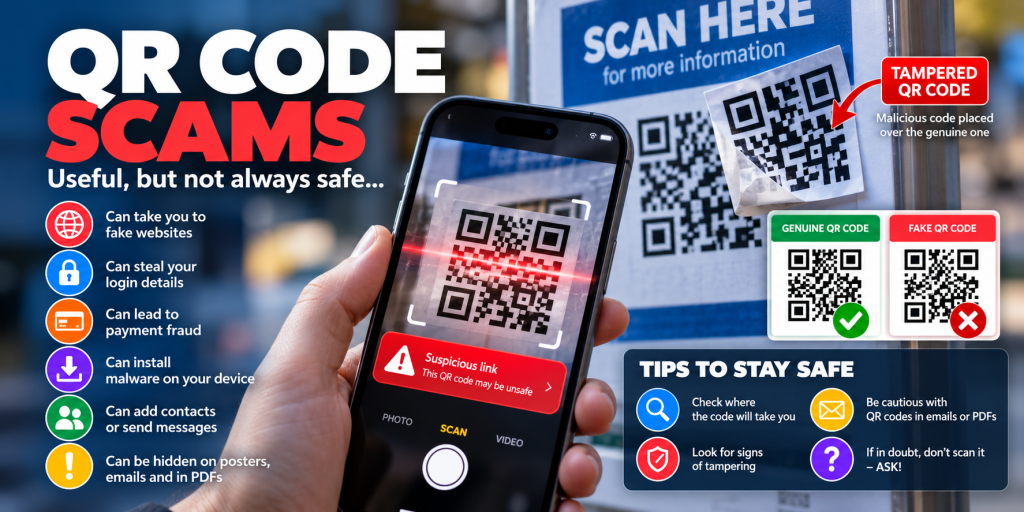
QR Codes: Think Before You Scan
QR codes are everywhere.
Restaurants, parking meters, invoices, posters, emails, parcel notifications and even business cards use them. Point your phone at the little square, tap the link and you’re there.
Convenient? Absolutely.
Always safe? Unfortunately not.
Cyber criminals increasingly use QR codes to direct people to fake websites designed to steal passwords, payment details and other personal information.
This type of attack is sometimes called QR phishing or “quishing”.
⚠️ What’s the danger?
The biggest problem with a QR code is simple:
You can’t see where it is taking you just by looking at it.
A malicious QR code can direct your phone to a website controlled by an attacker. That website might look almost identical to Microsoft 365, your bank, a delivery company or another service you recognise.
You scan the code, see a familiar-looking login page and enter your username and password.
Unfortunately, you’ve just given them to the attacker.
🎭 Fake QR Codes Can Look Completely Genuine
Attackers don’t need to hack the original QR code.
They can simply put their own QR code over the top of it.
Imagine a genuine QR code on:
- A parking meter
- A restaurant menu
- An EV charging point
- A poster or advertisement
- A payment terminal
- A public information sign
A criminal can place a sticker containing their own QR code over the genuine one.
You scan it believing you’re paying for parking or visiting the organisation’s website, but you’re actually being redirected somewhere completely different.
Before scanning a public QR code, look at it.
Does it look like a sticker has been placed over another code? Does it feel raised? Does anything about it look unusual?
If something doesn’t look right, don’t scan it.
📧 QR Codes in Emails Are Another Warning Sign
QR codes are also increasingly used in phishing emails.
You might receive an email claiming:
Your Microsoft 365 password is about to expire.
Scan the QR code to keep your account active.
Or:
HR has shared a confidential document with you.
Scan the QR code to view it.
Or perhaps:
Your account requires immediate verification.
The QR code moves part of the attack away from your computer and onto your phone, which can make traditional email security systems less effective at identifying the final destination.
It also encourages you to move from a managed computer onto a personal mobile device, where you may be less likely to notice something suspicious.
🔐 A QR Code Should Never Bypass Your Common Sense
Treat a QR code exactly as you would an unexpected link in an email.
Before opening anything, ask yourself:
- Was I expecting this?
- Who sent it?
- Why am I being asked to scan a QR code?
- Why can’t I simply visit the organisation’s normal website or app?
- Is the website address shown by my phone actually correct?
If you’re being asked to enter a password, payment information or personal details, be particularly cautious.
🛑 Stop Before You Enter Your Password
Scanning a QR code doesn’t automatically mean you’ve been compromised.
If you’ve scanned one and the resulting website looks suspicious, close the page.
The bigger danger often comes when you continue and enter information such as:
- Your Microsoft 365 username and password
- Banking information
- Credit or debit card details
- Personal information
- MFA or verification codes
Never approve an unexpected MFA request just because a website tells you to.
✅ How to Stay Safe
Don’t blindly trust a QR code
A QR code is simply another way of presenting a link. Treat it with the same caution as a link in an unexpected email.
Check the destination before opening it
Most modern phones show the website address before you visit it. Take a moment to read it carefully.
Inspect physical QR codes
Look for stickers, signs of tampering or another QR code underneath the one you’re about to scan.
Be suspicious of QR codes received by email
Be particularly cautious when the message creates urgency or asks you to log in, verify your account or make a payment.
Use the official website or app instead
If a QR code supposedly takes you to your bank, Microsoft 365, a courier or another important service, consider opening the organisation’s official app or typing the website address yourself.
Never give away MFA codes
A legitimate organisation should not unexpectedly ask you to provide an authentication code through a website reached from a suspicious QR code.
When in doubt — ask
If an email supposedly came from HR, your IT department, your bank or another organisation, contact them using details you already trust.
🚨 Already Scanned a Suspicious QR Code?
Don’t panic, but don’t ignore it either.
If you only opened the website and didn’t enter anything, close the page.
If you entered a password, change that password immediately using the genuine website.
If the same password is used elsewhere, change it there too.
If you approved an MFA request or entered an authentication code, contact your IT administrator or service provider immediately.
If you entered banking or card information, contact your bank or card provider using the number printed on your card or their official website.
💡 Remember
A QR code isn’t trustworthy simply because it’s printed on something official-looking.
Think of every QR code as a link you can’t see until you scan it.
STOP. CHECK. THEN SCAN.
A few seconds of caution can prevent a stolen account, compromised payment card or a much bigger security incident.
🎥 QR Code Security Explained
Watch the video below for more information about QR code security and the risks associated with malicious QR codes.